Using Flinzy on Two Devices (Device Limit, "Device Removed", Signing Out Other Devices)
Devices and Your Account
Your Flinzy subscription belongs to your account, not to one tablet. Log in with the same email on another device and your subscription is there too.
To keep accounts from being shared, you can have 2 devices signed in at the same time.
⚠️ Logging out does not free up a device slot
Tapping Log out signs you out on that tablet, but the device stays on your account and keeps using one of your two slots. To actually free a slot — before selling a tablet, returning a rental, or handing one back to a venue — remove it from the device list, or use Sign out other devices. Both are covered below.
When You Reach the Limit
Log in on a third device and Flinzy stops and shows you the two devices already on your account, each with the date it was last used:
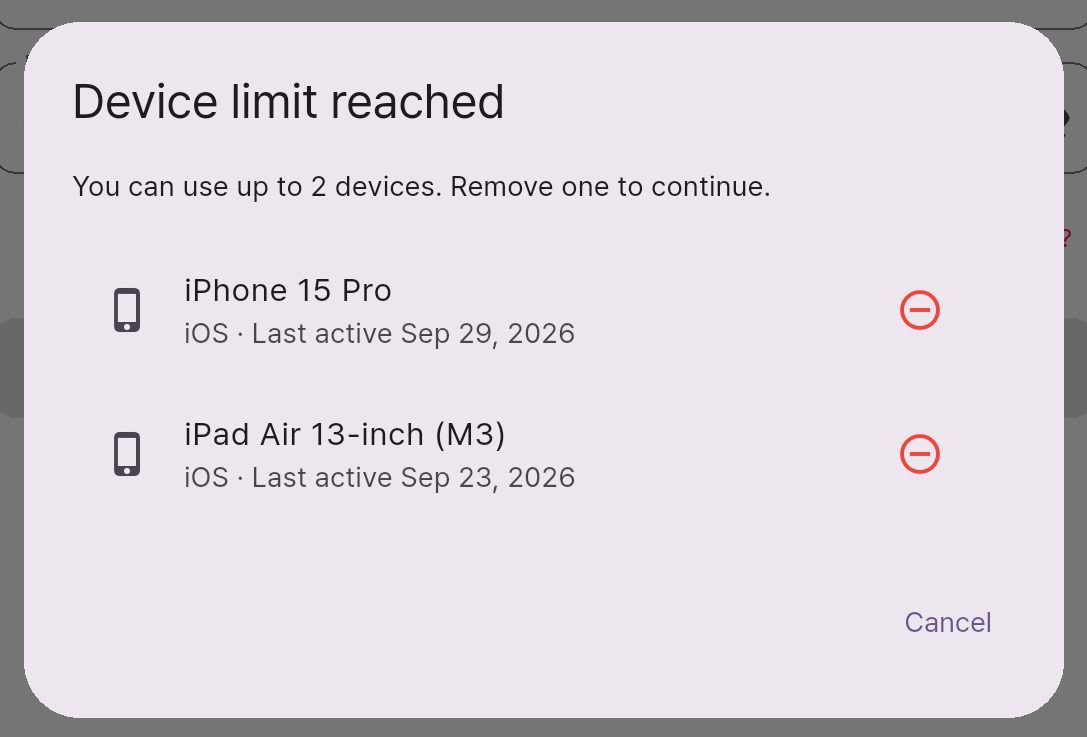
Tap the remove button beside the device you no longer use, confirm, and the login continues on your new device.
Removing a device here is the clean way to free a slot. Nothing expires on its own — a tablet you stopped using a year ago still holds its slot until you remove it.
"This device was removed from your account"
A device shows this when it was removed from the list above — usually by you, from another device.
What it means on that device:
| Your subscription | Safe. It belongs to your account, so signing in again brings it back on this device. |
| Your photos and events | Safe on your account, not deleted. |
| Running a photobooth | Paused on this device until you sign in again. |
Sign in with your email and password and the device is restored — it rejoins your account, your subscription is there, and starting events works immediately. If that puts you over two devices again, you will be asked which device to remove.
Signing Out Every Other Device
If you are not sure which devices are signed in — a borrowed tablet, a rental returned without being logged out — find the Sign out other devices option in Settings.
It signs out every device except the one you are holding, which is never signed out. Your subscription is unaffected, and any device you still want to use can simply sign in again.
Common Questions
Does reinstalling the app use up another slot? No. Flinzy recognises the same tablet after a reinstall and reuses its existing slot.
Do I need to log in at all? Only to use your subscription on more than one device, and to keep your photos and events tied to your account rather than to one tablet.
Can I run two photobooths at the same time? Yes — two signed-in devices can both run events.